
Blogpost
Mar 17, 2026
Your Voice Agent Analytics are Expensive Logging - How to Change That?
You shipped a voice agent. First hundred calls felt like magic. By ten thousand, you noticed problems. So you did the responsible thing == you built analytics.
You wired up a post-call analysis pipeline. An LLM reads every transcript, scores the agent 1–10, extracts critical issues, flags incorrect dispositions.
You built a dashboard. Scores by agent version, issues by priority, performance over time.
Two hundred thousand calls later, you're staring at a dashboard that says "average score: 5.5 " and a list of 99 critical issues. You've iterated through 20 prompt versions. The score hasn't moved.
You don't have an analytics problem. You have an eval problem. And the difference is the entire gap between "we measure things" and "things get better."
The Three Walls
Every team scaling voice agents hits the same three walls in the same order. I've now seen this pattern across enough implementations that I'm convinced it's structural, not accidental.
Wall 1: Nobody scored the scorer
You have an LLM judge rating your calls. It says 5.5 out of 10. But who rated the rater?
If you haven't had a human independently score 30–50 conversations and compared those ratings against your LLM judge, you don't know if 5.5 is real. Maybe it's a 7.5 and your judge is harsh on calls that actually converted. Maybe it's a 7 and the judge gives credit for sounding polished while missing that the agent never asked the qualifying question.
If your team have their LLM judge configured with the agent's own prompt as scoring context, the judge is essentially asking "did the agent follow its instructions?".
That tells you very little about whether those instructions are any good. The agent could follow the script perfectly and still lose the lead.
Every prompt change made against an uncalibrated judge may have been moving sideways.
Wall 2: 99 issues, no conversion map
Your analysis pipeline flags critical issues after every call. You open the dashboard and see dozens. Some are real - the agent fails to handle the objection when a prospect says "how do I verify you're legit?". Rest is cosmetic - slightly awkward phrasing that doesn't affect the outcome.
But they're all sitting in the same list with the same weight.
Until you map issues by conversion impact == which patterns actually kill your qualified lead rate vs. which ones just sound bad in a transcript then you're fixing things at random.
And with a single-prompt agent on a platform like Retell or ElevenLabs, every fix risks breaking something you already fixed.
You need to understand what's moving agent forward and what's just a noise.
Wall 3: The loop doesn't close
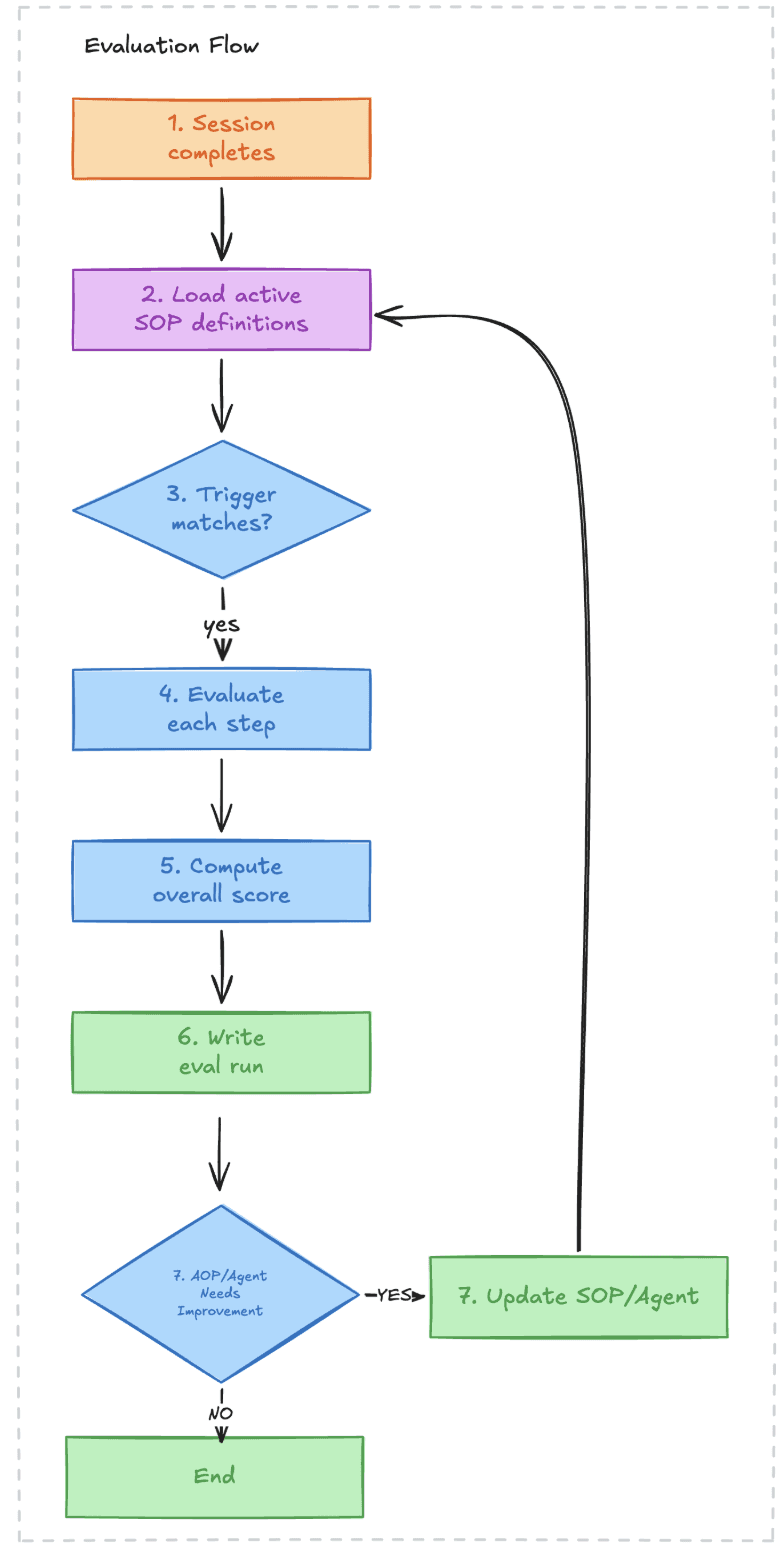
This is the real killer. You have scores. You have issues. You even have suggested prompt edits. But the workflow is:
Open dashboard
Read the issue
Copy the suggested prompt change
Paste it into the agent configuration
Hope it doesn't break something else
Publish a new version
Wait for more calls
Check the dashboard again
That's a human doing serialized copy-paste across two systems. Multiply by multiple agents, multiple campaigns, multiple prompt versions. It doesn't scale.
The dashboard becomes expensive logging. It tells you what happened. It doesn't make anything better.
Analytics vs. Evals - The Distinction That Matters
Analytics tell you what happened. Call scored 6.2. Three critical issues detected. Disposition was incorrect.
Evals tell you whether a change made things better or worse before it hits production.
The difference is a regression test suite.
The first is a log. The second is an engineering decision.
What are the types of evaluations you should care about the most?
If you want to read more about evals per se I highly recommend getting familiar with Hamel Husain's content https://hamel.dev/blog/posts/evals-faq/
What an Eval Pipeline Actually Looks Like
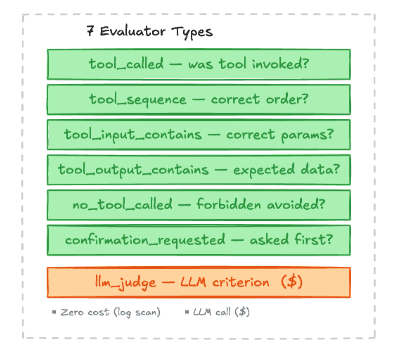
Here's the architecture we've been building at Modelguide. The core insight: you need different types of checks for different failure modes, and most of them don't need an LLM at all.
The key design decision: deterministic checks first, LLM judge second.
Most of the failures that kill conversion are binary:
Did the agent call the end-call function or started reading tool call names out loud?
Did it include the customer's order ID in the lookup request?
Did it trigger the escalation when the customer asked to speak to a manager?
You don't need an LLM to check these. A simple tool_called evaluator that verifies the agent invoked the right function with the right parameters is faster, cheaper, and more reliable than asking Claude to assess the whole conversation.
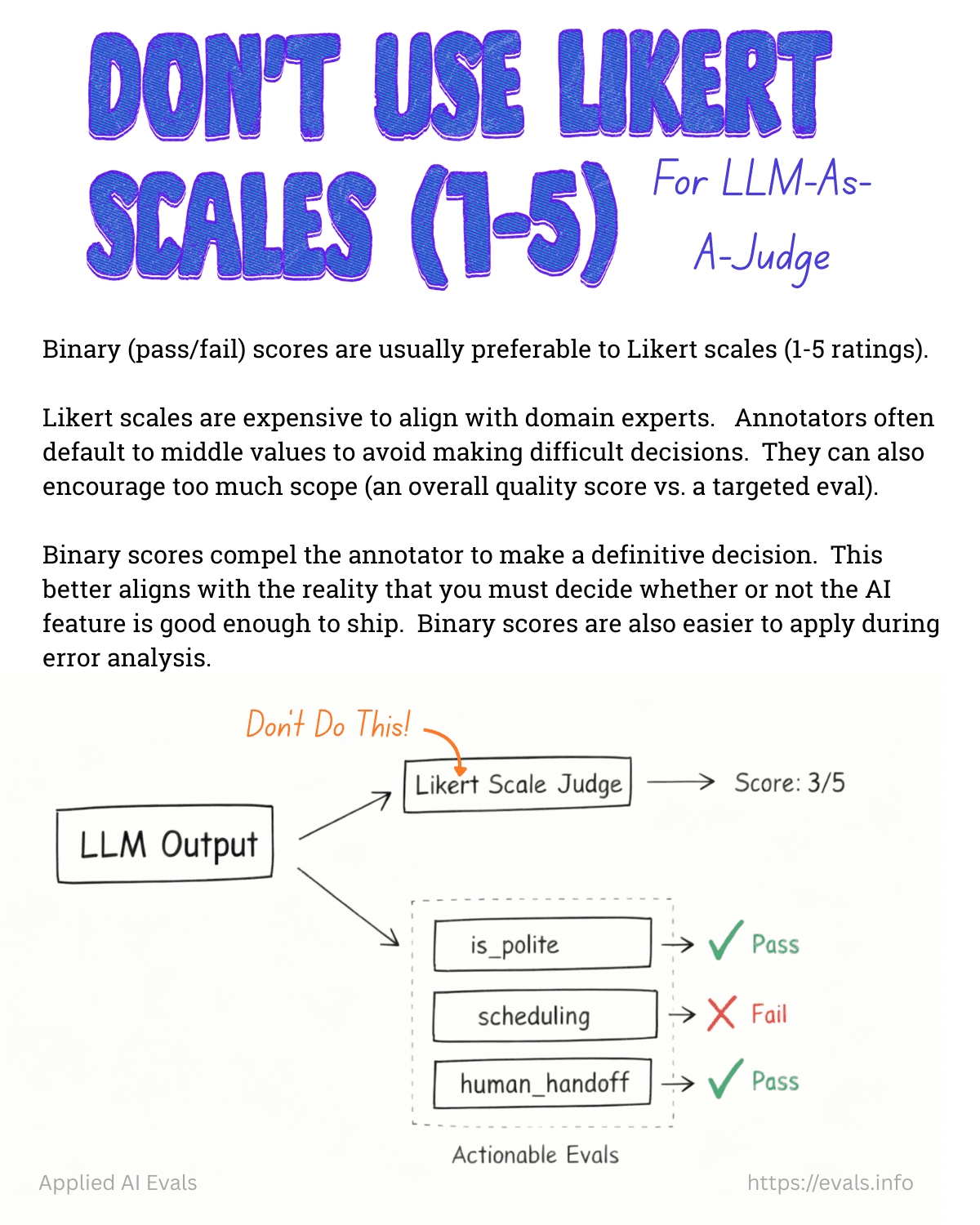
The LLM judge is for the stuff that's genuinely subjective - was the objection handling smooth? Did the agent sound natural? Was the tone appropriate for an upset customer? And critically, you only trust it after you've calibrated it against human ratings.
And with LLM-as-a-judge you should define global vs custom rules, as per example below:
Category | Scope | Authored By | Example |
|---|---|---|---|
Common (built-in) | Platform-wide, shipped as pre-configured evaluator step templates | Platform maintainers | "Was the agent following brand/company policies?", "Was the agent professional and courteous?", "Did the agent avoid sharing other customers' data?" |
Custom (per-SOP) | Org-specific, defined within individual SOP steps | Org managers/admins | "Agent verifies customer identity before accessing account", "Agent explains refund timeline in plain language" |
The Eval Config Reference
tool_called — Was a specific tool invoked?
Use when: You need to verify the agent used a particular tool at any point during the session.
How it works: Scans session tool call log for at least one call matching the resolved tool name.
Cost: Zero (pure log scan). Use this as the default when you just need to confirm tool usage.
tool_sequence — Were tools called in the right order?
Use when: The procedure requires tools to be called in a specific sequence (e.g., lookup before modify).
How it works: Walks the tool call log checking that tools appear in order. Supports | alternatives: "get_order|look_up_order" matches either.
Cost: Zero (log scan). Prefer this over multiple tool_called steps when order matters.
tool_input_contains — Did the tool receive correct input?
Use when: You need to verify the agent passed specific parameters to a tool (e.g., correct order ID format, required fields present).
Cost: Zero (log scan + assertion check).
tool_output_contains — Did the tool return expected data?
Use when: You need to verify pre-conditions based on tool output (e.g., order status is not "shipped" before allowing modification).
Cost: Zero (log scan + assertion check).
no_tool_called — Were forbidden tools avoided?
Use when: The agent must NOT call certain tools in this scenario (e.g., no direct refund processing for high-value orders).
Cost: Zero (negative log scan).
confirmation_requested — Did the agent ask before mutating?
Use when: A mutation tool (e.g., set_delivery_address) requires the agent to ask the customer for confirmation first.
How it works: Finds the tool call in the log, then looks at preceding assistant messages (within the turn window) for a regex match against confirmation language.
Cost: Zero (log scan + regex).
llm_judge — LLM-evaluated natural-language criterion
Use when: The check cannot be expressed as a tool log assertion — tone, policy adherence, reasoning quality, behavioral requirements.
How it works: Sends the full conversation transcript + criterion (+ optional rubric) to an LLM judge. Returns pass/fail with reasoning.
Cost: External LLM call (latency + cost). This is the only evaluator that makes external calls. Use deterministic evaluators first; reserve llm_judge for checks that genuinely need language understanding.
Best practices for criterion writing:
Be specific: "Agent asked for name AND order ID" > "Agent verified identity"
Include temporal constraints: "BEFORE performing any order lookup" not just "at some point"
State what should NOT happen when relevant: "Agent did NOT process refund directly"
If the criterion is complex, use the
rubricfield for a detailed scoring guide
The platform trap
If you're building on Retell, Vapi, ElevenLabs, or any other managed voice agent platform, you probably felt that these platforms are great agent builders (to some extend of course if you don't need a full visibility to debug and improve)
They handle the hard parts: real-time latency, voice model integration, telephony. But they give you a single prompt field and a dashboard. The eval pipeline, the labeled datasets, the regression tests, the automated feedback loop - that infrastructure doesn't exist.
Eleven is improving extremely fast in the right direction - that's an honorable mention!
But the case for many companies is that…. it shouldn't exist inside those platforms.
The eval pipeline should be yours. It encodes your business logic, your success criteria, your domain expertise. When you switch platforms (and you will - the team that starts on Retell moves to Pipecat for full pipeline control, the one on Vapi moves to LiveKit for latency tuning), your evals should travel with you.
The labeled dataset you build from real conversations is your actual IP.
So how do you start building this harness for voice agents?
The starting point isn't the automated feedback loop. It's the test harness.
Take real conversations. Label them:
Correct disposition: what should the outcome have been?
Expected behavior at each decision point: when the prospect said "how do I know you're not scam?", what should the agent have done?
Bucket by failure mode: qualification success, gatekeeper handling, objection recovery, etc.
These become input/expected-output pairs. A regression test suite.
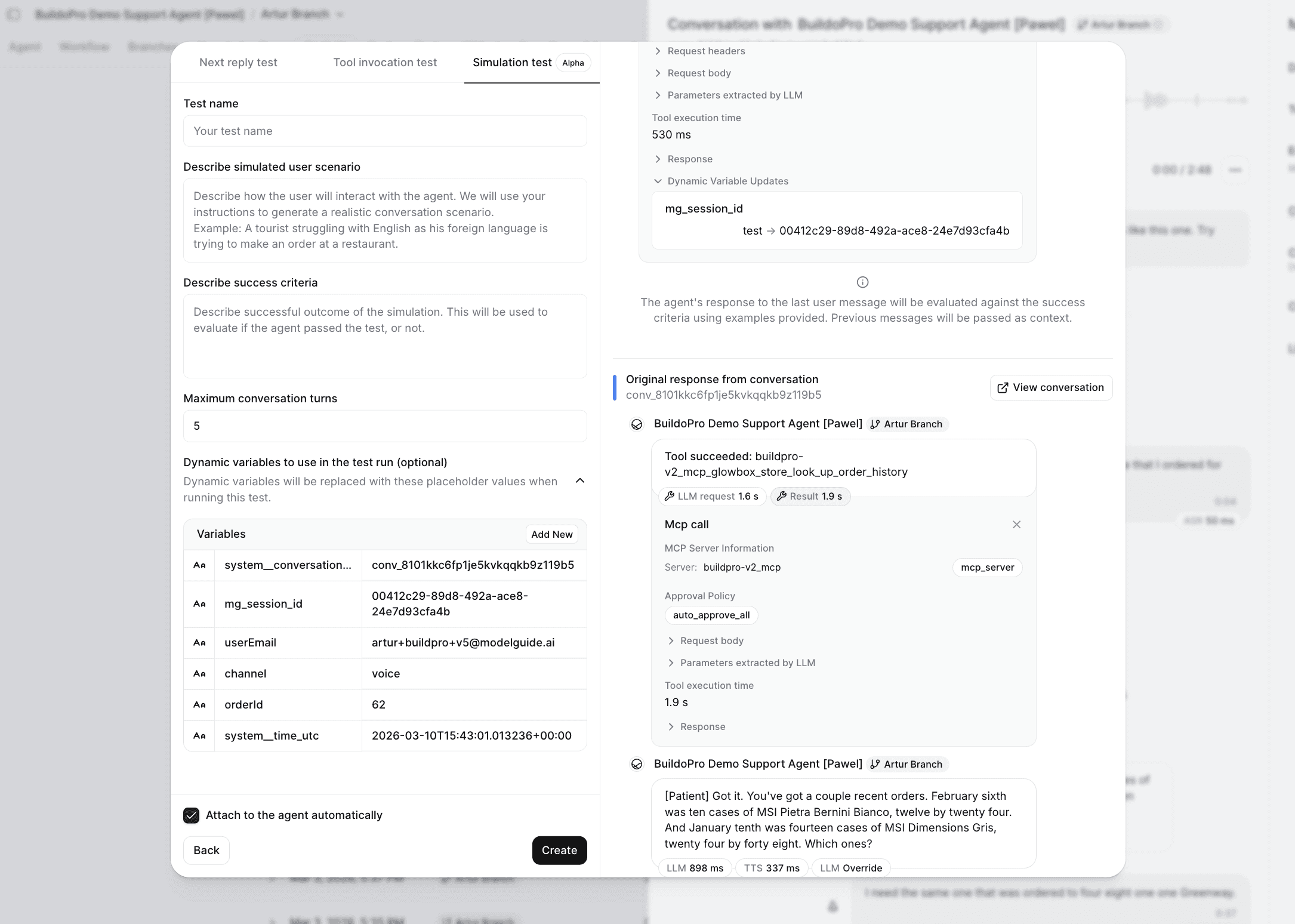
Then wire it: before any new prompt version ships, it runs against this dataset:
The deterministic evaluators (
tool_called,tool_input_contains) catch the binary regressions immediately.The
llm_judgeevaluators catch the subjective ones. You get a report before a single live call is made.
The end state is an automated feedback loop where issues detected in production automatically generate validated prompt changes.
But you can't automate a loop you haven't validated. Calibrate the judge first. Build the test harness. Prove that prompt changes measurably improve scores against real test cases. Then close the loop.
Blog